How to organise your X bookmarks into folders
By Chiratna, founder of Zappmark · Updated
X lets you sort bookmarks into folders, but only on a paid X Premium plan, which starts at $3 a month for Basic. Without Premium, X keeps bookmarks in one long list. The alternative is a tool that sorts each save for you: Zappmark puts every post you save onto a shelf by topic, with no folders to set up.
Make bookmark folders on X
Bookmark folders on X (formerly Twitter) are part of X Premium. X's Premium help page lists them under Basic, its cheapest tier, and every higher tier includes them. X's help pages describe two ways to make one, and both start from a post you've already bookmarked.
From a post:
- Bookmark the post.
- Long-press the bookmark icon on the post.
- Choose Add to Folder, then tap the icon to create a new folder and give it a name.
From your Bookmarks page:
- Open Bookmarks from your profile menu.
- Tap the New Folder icon at the bottom of the page.
- Enter a name and tap Create.
To move a saved post into a folder later, open All Bookmarks, long-press the bookmark icon on the post, and tap the folder's name. A post can sit in more than one folder.
A folder system that stays tidy
Folders only help if you keep filing. A few habits make that easier:
- Keep to five to eight folders. More than that and you spend longer choosing than saving.
- Name folders by what you'll do with them, not by topic alone. "To read this week", "Ideas for the newsletter" and "Hiring" are easier to act on than "Misc".
- File at the moment you save. A pile of unfiled bookmarks rarely gets sorted later.
- Empty one folder a month. Delete what you no longer need so each folder stays short.
If you don't pay for Premium, a short list is easier to manage than a long one. Bookmark a post when you mean to act on it, then remove the bookmark once you have. X lets you remove bookmarks one at a time or clear them all at once, so a fresh start is always one step away. Before you clear the list, copy the posts you still want somewhere you can search.
Folders, tags or automatic shelves
Tools organise saved posts in three ways: folders you file by hand, tags, and automatic sorting. Here's what each option offers, from each tool's own pages on 4 October 2026.
| Option | How it organises | Who does the sorting | Cost |
|---|---|---|---|
| X bookmarks, free | One list | Nobody | Free |
| X bookmark folders | Folders; a post can be in several | You, by hand | X Premium, from $3 a month |
| Dewey | Folders and tags | You, or AI tags from interests you type | Free plan; Pro $10 a month |
| Tweetsmash | Labels, folders, topics | Auto-organise by topic and author | From $7 a month |
| mymind | AI tags and Smart Spaces; no folders | AI | From $4.99 a month (AI from $7.99) |
| Zappmark | Shelves by topic, plus Saved as labels | AI, as you save | Free up to 50 saves; $3 a month |
Let Zappmark sort them for you
Zappmark skips the filing step. Hold Option on a Mac (Alt on Windows), then click a post on X to save it. An AI model reads the post's text and puts it on a shelf such as Design, Engineering or Startups. You don't create the shelves first.
- Install the Zappmark extension in Chrome and sign in with Google.
- On x.com, hold Option (Alt on Windows) and click a post you want to keep.
- Open your library at zappmark.com/library. New saves appear on their shelf.
- If a save lands on the wrong shelf, move it. Your change sticks.
- Use "Saved as" labels, such as Read later, for what you plan to do with a post.
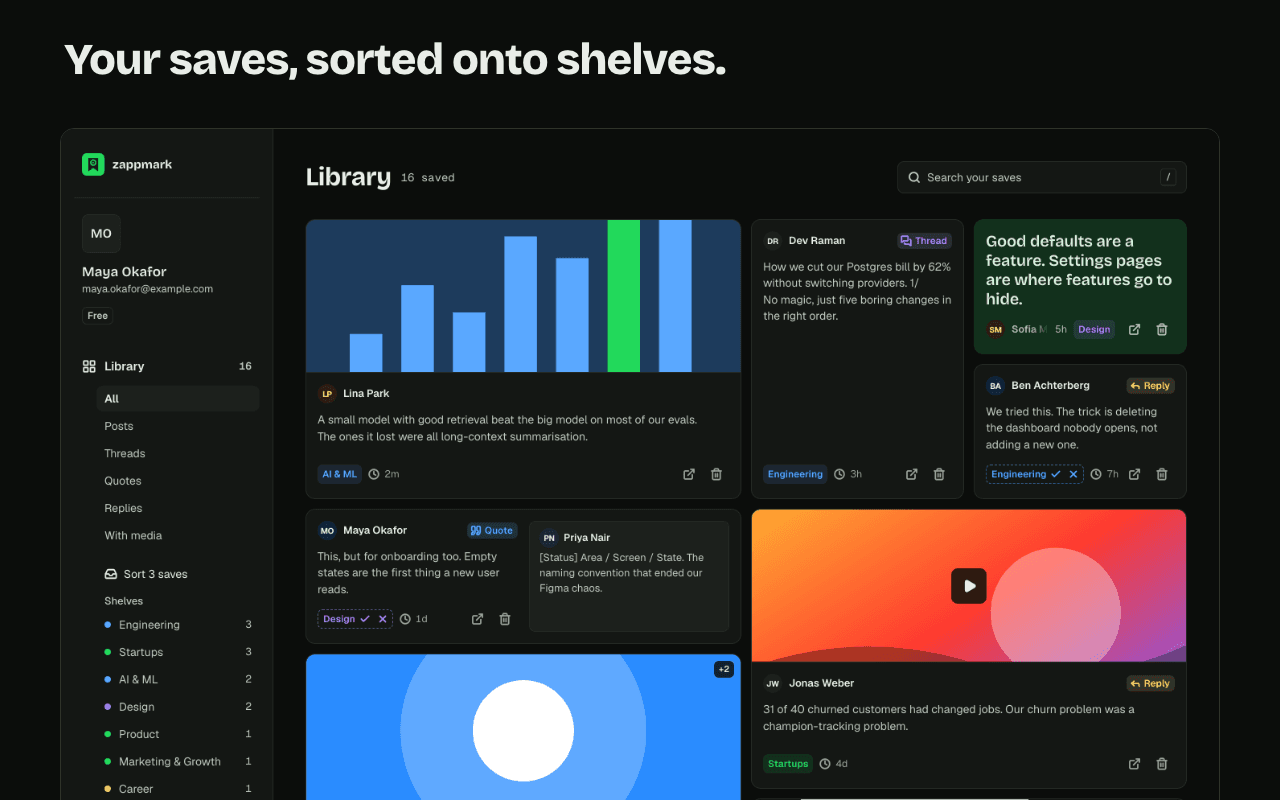
Search by meaning: search finds a save by what it said, not only by the exact words. Zapback: once you have 5 or more saves, a weekly email on Mondays brings back 3 posts you saved and haven't opened since.
Shelves and search are on the free plan, which holds 50 saves. Pro is $3 a month for unlimited saves.
Which approach suits you
- You already pay for X Premium and file as you go: X's folders are enough, and they work on your phone.
- You want folders and tags across many sites, with export: Dewey.
- You'd rather read your bookmarks as a digest by topic: Tweetsmash.
- You save at a computer and never get round to filing: Zappmark's shelves, and the Monday Zapback email to bring old saves back.
Zappmark's limits: it saves from X only today. It's a Chrome extension; there's no mobile app. It doesn't import or sort the bookmarks you already have on X. For finding posts once they're organised, see how to search your X bookmarks.
Questions
Are X bookmark folders free?
No. X's help centre lists bookmark folders as an X Premium feature. The cheapest tier, Basic, is $3 a month or $32 a year on the web.
Can a post be in more than one X bookmark folder?
Yes. X's help pages describe adding a bookmarked post to more than one folder.
Can Zappmark organise the bookmarks I already have on X?
No. Zappmark sorts the posts you save with it from the day you install it. It doesn't import your X bookmarks.
Can I change the shelf Zappmark picks?
Yes. Move a save to another shelf in your library and the change sticks.