X bookmarks vs Zappmark: when the built-in bookmarks aren't enough
By Chiratna, founder of Zappmark · Updated
X's own bookmarks are free, private and built into every app, but folders need a paid X Premium plan (Basic starts at $3 a month), and X's help pages don't document a way to search them. Zappmark sorts each save onto a shelf by itself, searches by meaning and emails you forgotten saves each week. It's free up to 50 saves; Pro $3 a month or $27 a year, and it works in Chrome on a computer only.
What X's bookmarks do
Bookmarks on X (formerly Twitter) are a private list of posts. X's help centre says they're "only viewable to you within your X account". In the app you tap the bookmark icon on a post; on the web you can also use the share icon and choose "Add post to Bookmarks". You can remove them one at a time or all at once.
That's enough for many people. It's free, it's on your phone, and nobody else sees it.
The gaps show up once the list gets long:
- Folders are a Premium feature. X's Premium help page lists bookmark folders under Basic, its cheapest tier, and the higher tiers include everything in Basic.
- Search isn't documented. X's help pages don't describe a bookmark search. Third-party guides report a keyword search box on the web and iOS that matches exact words only.
- Nothing is sorted for you. Bookmarks are one long list in the order you saved them, unless you file each one into a folder by hand.
- Nothing comes back. X doesn't remind you of old bookmarks; you scroll.
- Export isn't documented. X's page on downloading your data archive doesn't list bookmarks among what's included.
Side by side
| Feature | X bookmarks | Zappmark |
|---|---|---|
| Price | Free; folders need Premium, from $3 a month | Free up to 50 saves; Pro $3 a month |
| How you save | Bookmark icon, or Share > Add post to Bookmarks | Hold Option or Alt and click the post |
| Private | Yes | Yes, your library is private |
| Organising | Folders, filed by hand (Premium) | AI sorts saves onto shelves |
| Search | Not documented by X; third parties report keyword only | By meaning, plus More like this |
| Brings old saves back | No | Zapback email, 3 saves every Monday |
| If the author deletes the post | Not stated | Kept, with copies of images and video |
| Export | Not listed in the data archive | Not yet |
| Where it works | X apps and web | Chrome and Chromium browsers on a computer |
What Zappmark adds
- Saving in one move: hold Option on a Mac (Alt on Windows), then click a post on X to save it.
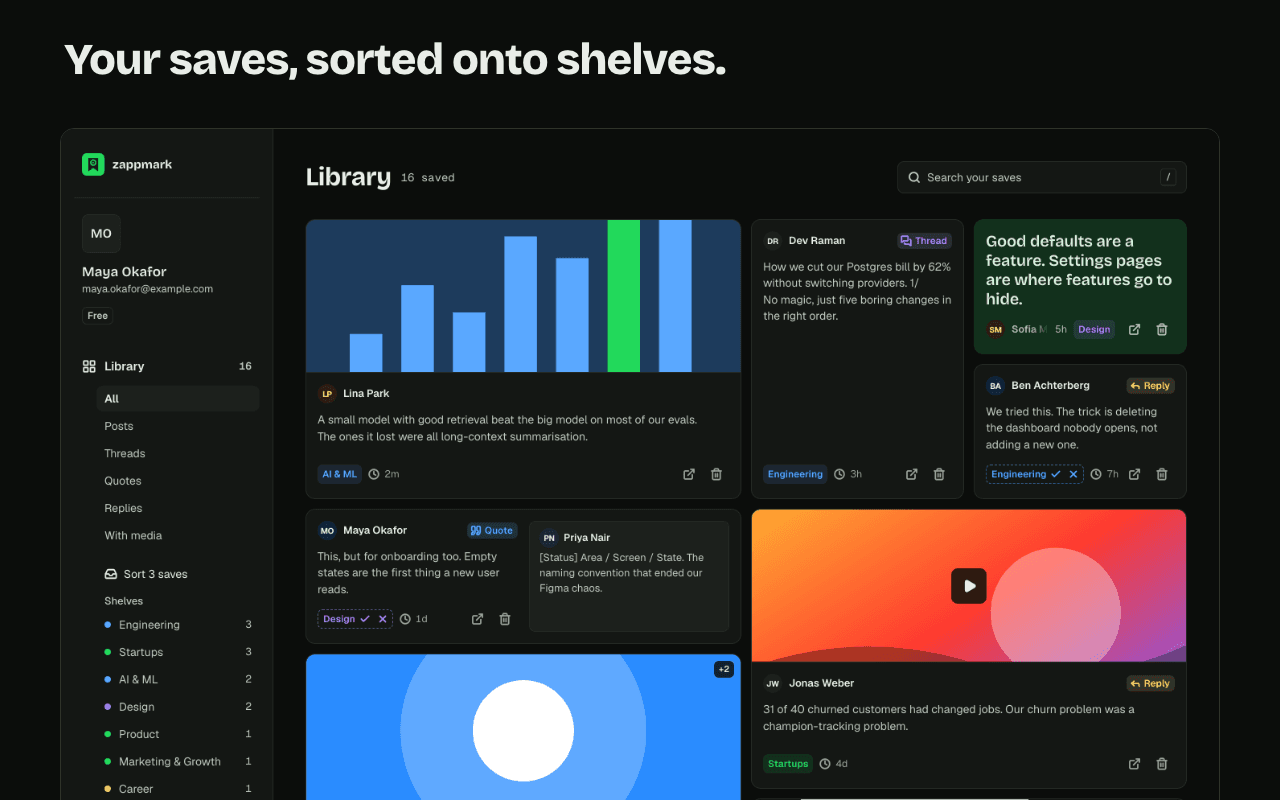
- AI shelves: new saves are sorted onto shelves (such as Design or Engineering) for you, with no folders to set up.
- Search by meaning: search finds a save by what it said, not only by the exact words.
- More like this: open a save to see your other saves nearest in meaning to it.
- Zapback: once you have 5 or more saves, a weekly email on Mondays brings back 3 posts you saved and haven't opened since.
- Your saves stay in your library even if the original post is deleted. Zappmark copies the images and video into its own storage, per its privacy policy. X's help pages don't say what happens to a bookmark when the author deletes the post.
Where X's bookmarks win
Be clear about what you give up or don't gain:
- Phones. X bookmarks work in the X app on your phone. It's a Chrome extension; there's no mobile app.
- Your history. Zappmark doesn't import your existing X bookmarks. It saves what you shoot from the day you install it.
- Price for light use. X bookmarks are free with no stated cap. Zappmark is free up to 50 saves.
- Threads. For a thread, Zappmark stores the first post today, with a link to the rest of the thread on X.
- Export. There's no self-serve export yet.
Many people use both: bookmark on the phone, shoot with Zappmark at the desk when a post is worth keeping.
How to decide
Stay with X's bookmarks if you save a few posts a week, mostly on your phone, and rarely go back to them.
Try Zappmark if you save at a computer, your bookmarks have turned into a list you never open, and you'd rather have them sorted and handed back to you. The free plan's 50 saves are enough to tell. For other tools, see the best X bookmark managers.
Questions
Do you need X Premium for bookmark folders?
Yes. X's help centre lists bookmark folders as a Premium feature, starting with the Basic tier at $3 a month or $32 a year on the web.
Can you search your bookmarks on X?
X's help pages don't document a bookmark search. Third-party guides report a keyword search box on the web and iOS that only matches exact words. Zappmark searches saves by meaning.
What happens to an X bookmark when the post is deleted?
X's help pages don't say. Your saves stay in your library even if the original post is deleted.
Does Zappmark replace X bookmarks?
It doesn't have to. Zappmark doesn't import or change your X bookmarks. You can keep bookmarking on your phone and use Zappmark at your computer for posts you want sorted and brought back.